
Understanding Vendor Lock-In and How Open Source Sets You Free
Vendor lock-in occurs when a technology provider makes it costly, disruptive, or complex to switch to an alternative platform. This means your systems become tied to one vendor’s products and services, making it difficult to move workloads or data. Vendor lock-in affects costs, flexibility, and innovation in IT and cloud infrastructures. When you focus on virtualization without vendor lock-in, you reduce risk, improve choice, and retain control over how and where systems run. Open source technologies play a key role in reducing these constraints and giving organizations greater strategic flexibility.
Vendor lock-in refers to a situation where a system is so dependent on one vendor’s design and standards that switching platforms becomes a barrier. In cloud and virtualization environments, proprietary formats, closed APIs, and long contractual commitments can make it difficult for organizations to transition between platforms. When you cannot move data easily or must overhaul configurations to leave a provider, you are locked in. Virtualization without vendor lock-in means building systems that avoid those barriers and remain portable.
Why Vendor Lock-In Matters
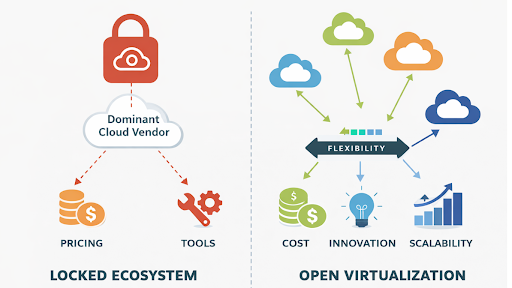
Vendor lock-in reduces your freedom to innovate. If you are tied to one vendor, pricing changes or feature limitations affect your cost and performance. Many organizations delay upgrades because proprietary dependencies create migration hurdles, steep retraining costs, or incompatibilities with new technologies. These factors slow growth and increase the total cost of ownership. Virtualization without vendor lock-in gives you the choice to adopt tools that serve your current needs and let you adapt over time.
Vendor lock-in also limits competition in your environment. Organizations may have less flexibility in negotiating pricing or service terms when workloads are tightly integrated with a single provider’s framework. Data stored in proprietary formats may require specialized extraction tools, raising migration expenses and risk. That is why virtualization without vendor lock-in matters for resilient architectures that serve strategic goals.
How Virtualization Without Vendor Lock-In Works
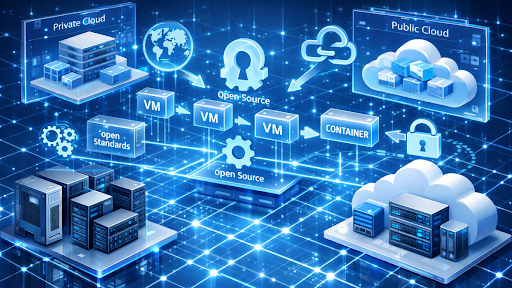
Virtualization without vendor lock-in starts with open standards and open source technologies. Open source virtualization platforms allow organizations to run virtual machines, containers, and applications with greater flexibility and reduced dependency on proprietary technologies. Examples include open virtualization technologies such as KVM-based platforms and modern container platforms that support both virtual machines and containers.
Open source systems give you access to code, transparent documentation, and the ability to move workloads freely. You avoid proprietary traps that restrict portability and limit migration flexibility. This is a key aspect of virtualization without vendor lock-in because standard formats and open interfaces make switching less risky and less expensive.
When organizations adopt open source virtualization platforms, they often gain more flexibility in choosing support models and infrastructure providers. Instead, you build infrastructure that runs on diverse hardware and across both private and public clouds. This flexibility supports hybrid models where you avoid dependency on a single provider.
Practical Benefits Of Virtualization Without Vendor Lock-In

Virtualization without vendor lock-in brings clear advantages for IT teams and organizations. First, you retain control over data and infrastructure. Data stored in open formats avoids proprietary barriers and lets you manage migration cycles without vendor permission.
Second, avoiding lock-in reduces long-term expenses. Proprietary virtualization platforms often charge per core or charge ongoing license fees. Open source alternatives often reduce licensing constraints and provide more flexible cost models based on subscriptions or support services. This supports predictable budgets.
Third, open source ecosystems broaden choice. You can deploy containers, VMs, and cloud services from different providers without rebuilding systems from scratch. That freedom gives you resilience and adaptability when requirements evolve.
Key Tools And Technologies That Support Virtualization Without Vendor Lock-In

Certain tools make virtualization without vendor lock-in practical in real environments. oVirt is an open source virtualization management platform that integrates compute, storage, and networking resources. It supports multiple systems and avoids proprietary lock, helping you build portable infrastructures.
Open source management and automation tools can also help organizations orchestrate workloads across multiple infrastructures while maintaining operational visibility. It lets teams provision and manage virtualized workloads across clouds and on-premises systems. Its open licensing and broad support help organizations avoid single vendor barriers.
Open source standards like KVM and tools supported by alliances promote interoperability and reduce dependency on proprietary formats. These standards help make virtualization without vendor lock-in achievable for modern architectures.
How To Achieve Virtualization Without Vendor Lock-In

Start by choosing open source platforms whenever possible. Open virtualization tools give organizations greater flexibility to configure systems and reduce dependency on proprietary technologies. Evaluate data portability and ensure exports use standard formats. This avoids hidden lock-in through opaque encryption or undocumented APIs.
Train your teams in open technologies to reduce skills dependency on any single provider’s environment. Broad expertise across open source tools reduces resistance to change and helps you pivot as needs evolve.
Build hybrid models that combine private and public infrastructures. Hybrid cloud architectures reduce reliance on a single service provider, allowing workloads to be distributed across multiple environments with greater flexibility.
Staying Alert To Lock-In Risks Even With Open Technologies
Open source does reduce vendor lock-in, but it does not automatically eliminate all risks. Managed services built around open source tools can still introduce subtle lock-in when data and control are tied to a provider’s operations. Choose deployments that give you full command of configurations, support data export, and allow you to move workloads between hosting environments with minimal restrictions.
Examine third-party enhancements that wrap proprietary extensions around open code. These enhancements can create invisible dependencies that mimic vendor lock-in. Ensure your architecture design prioritizes openness and portability for true freedom.
Conclusion
Understanding vendor lock-in shows why technology choices matter for infrastructure strategy. Virtualization without vendor lock-in gives you flexibility and removes costly barriers. By embracing open source solutions and open standards, you protect data, reduce costs, and retain control over how systems evolve. Freeing your infrastructure from lock-in makes IT more responsive, adaptable, and cost-effective.
WikiBlox: Malaysia’s Modern Approach to Virtualisation Without Vendor Lock-In
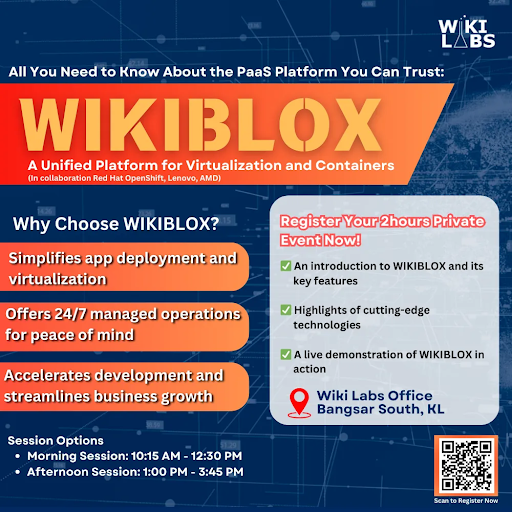
WikiBlox delivers a modern virtualisation foundation designed specifically for Malaysian enterprises. It unifies virtual machine and container workloads within a single platform, simplifying management, migration, and scalability.
Built around strong governance and local compliance frameworks, WikiBlox helps organisations modernise their IT environments confidently. For enterprises evaluating VMware alternatives, it provides a future-ready platform developed and supported within Malaysia.
WikiBlox: What You Should Know
WikiBlox by Wiki Labs Sdn Bhd is engineered on an enterprise-grade architecture that integrates Red Hat OpenShift with Lenovo infrastructure powered by AMD EPYC processors, all operated within Malaysia. The platform unifies virtual-machine and container workloads under managed operations with built-in governance, security, and compliance aligned to Malaysian enterprise standards.
A recent local deployment within the financial services sector demonstrated significantly faster provisioning and measurable cost efficiencies compared with traditional virtualisation environments. For organisations exploring VMware alternatives, WikiBlox distinguishes itself through local support, regulatory alignment, and optimisation for hybrid-cloud and container workloads.
How Wiki Labs Helps Manage Virtualisation Costs
Wiki Labs provides full-lifecycle services for enterprise virtualisation — from assessing existing VMware environments to designing migration frameworks and optimising operations post-deployment.
Through cost-transparency analysis, predictable licensing models, and Malaysia-based support, Wiki Labs helps organisations identify and reduce hidden expenses associated with legacy systems. Its consultants offer clear insights into the total cost of ownership (TCO) across leading VMware alternatives, ensuring each client selects the most cost-effective and scalable approach for long-term growth.
With deep local expertise and platform-agnostic hardware integration, Wiki Labs enables Malaysian enterprises to achieve operational clarity and sustainable cost efficiency in their modernisation journey.
Ready to Move Forward with Modern VMware Alternatives?
WikiBlox isn’t just another platform. It’s your all-in-one foundation for Malaysia’s enterprise IT future.
👉 Schedule a free consultation with Wiki Labs experts today to see how WikiBlox can power your transformation.
Disclaimer:
The information in this article is provided for general informational purposes only. All product names, trademarks, and registered trademarks are the property of their respective owners. References to third-party technologies such as VMware, Red Hat, Lenovo, AMD, and others are made solely to describe compatibility or comparison context and do not imply any endorsement or affiliation.
Wiki Labs Sdn Bhd makes reasonable efforts to ensure the accuracy of information at the time of publication; however, readers are encouraged to verify technical details and licensing information directly with the respective vendors.
